-
Syllabus & Downloads
- What is CMSIS and why Use it?
-
What is CMSIS? 1 min
-
Why CMSIS?
-
Who Delivers What? Microchip Implementation of Arm® Spec 1 min
- Installation Options: Quick Start or Add to System Path
-
Creating an Arm® CMSIS VS Code Profile 2 min
-
Installation of Arm® CMSIS Driver Packs Using Arm® Keil® Studio Pack (MDK v6) - PIC32CM PL10 4 min
-
Installation of Arm® CMSIS Toolbox CMD line tools and CMSIS Packs from Arm® Keil® Webpage 5 min
-
Microchip's Content in CMSIS Packs, www.keil.arm.com/packs 1 min
- Introduction to Examples, full ARM CMSIS Solution Examples
-
Running the Blinky Example, Complemented with a few MPLAB® Extensions (7 min) 7 min
-
Understanding the files in the Arm® CMSIS Solution Example 6 min
-
Running the Driver Example, Basic Debugging and Serial Monitor (5 min) 5 min
- Building on the Basic Examples, starting to write code...
-
Adding printf to the Driver Example, Using the Arm® Docs, modifying cproject.yml 11 min
-
Adding Code Snippet Examples, e.g. configure_adc.c 1 min
-
Using a PLIB Template Example to add ADC Functionality to our Project 11 min
-
Adding I2C to a Project SERCOM Clocks Callbacks 13 min
-
Implementing the full I2C Bus Scanner 7 min
- Using the DV Run Time Middleware Pack, for Live Variable Update Plotting
-
Introducing the MPLAB® Data Visualizer and the Data Visualizer Run Time (DVRT) Protocol 3 min
-
Running the DV Run Time Driver Example 7 min
-
Adding DVRT to the CNANO Explorer ADC ProxLight Example 14 min
- Quiz
-
Quiz: Mastering Next-Gen Development with CMSIS Solutions
- Feedback and Discussion
-
Get in contact with the presentation team
-
We need your feedback

Microchip CMSIS Application Development Using Solutions and Packs (Updated October 2026)
In this course, Glen Nilsen introduces Microchip's CMSIS-based development workflow using PIC32CM-PL microcontrollers. Learn how CMSIS Solutions, CMSIS-Packs, CMSIS-Drivers, and reusable software components simplify application development, improve portability, and accelerate feature implementation through practical examples and hands-on labs.
Course Summary:
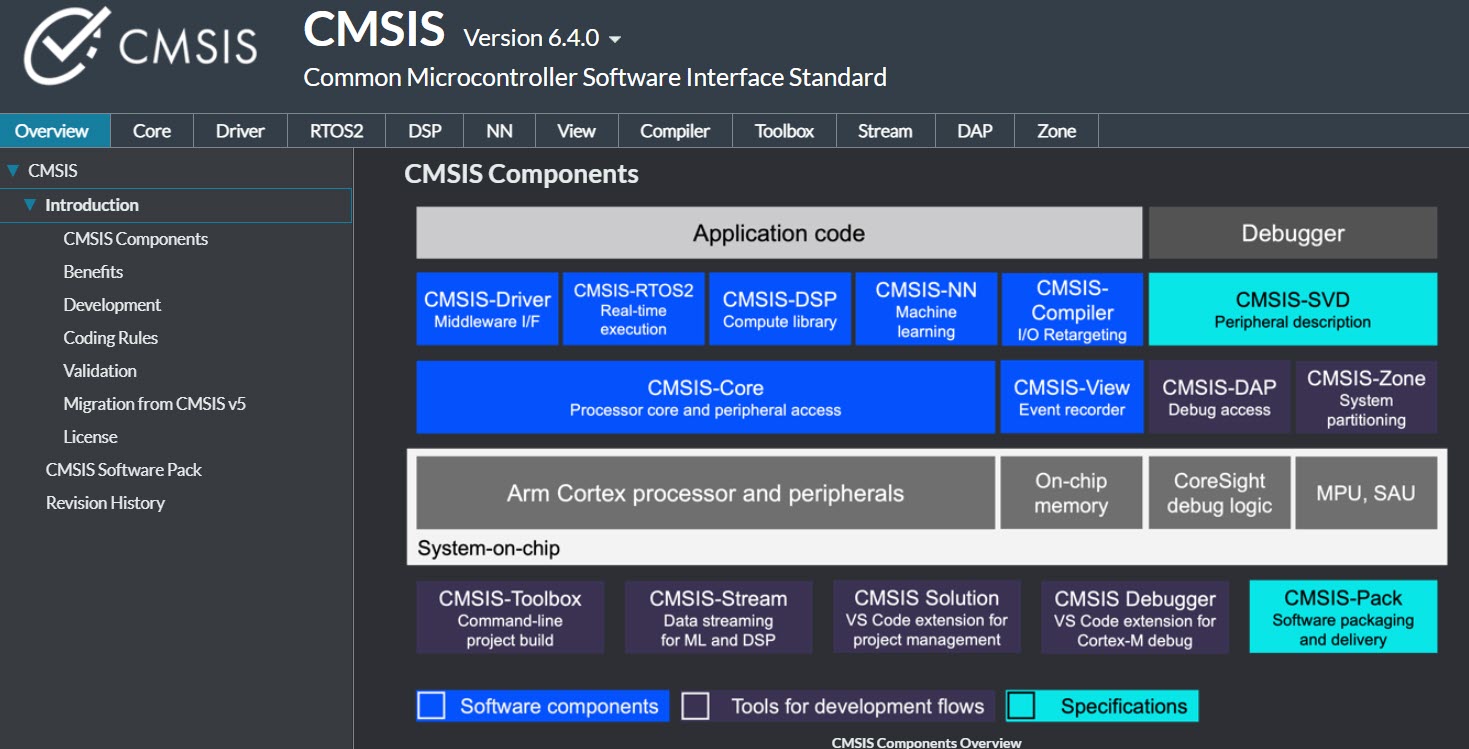
This course introduces embedded developers to the CMSIS ecosystem and demonstrates how Microchip implements CMSIS standards and integrates them into the MPLAB® development ecosystem in Visual Studio Code. Through a combination of guided demonstrations and practical examples, participants will learn how CMSIS ecosystem components, including CMSIS-Drivers, CMSIS-Packs, and CMSIS-Toolbox, fit together within a modern Microchip development workflow.
Rather than focusing solely on theory, the course follows the practical workflow used when developing real applications. Participants begin by exploring CMSIS solution examples, learn how to navigate CMSIS documentation and driver APIs, and then see how working applications can be extended using reusable template code snippets. Through a series of implementation walkthroughs, the course demonstrates how to build and run CMSIS-based projects, add peripheral functionality such as ADC interfaces, and integrate MPLAB® Data Visualizer Run Time (DVRT) middleware for runtime monitoring and visualization.
The course also provides an overview of Microchip's evolving tools ecosystem, including VS Code integration, CMSIS-Pack delivery mechanisms, Device Family Packs (DFPs), Generic Software Packs (GSPs), and the role of CMSIS standards in enabling software portability across toolchains and devices. Participants will gain a practical understanding of how CMSIS ecosystem components, together with Microchip development tools and software packs, can accelerate application development and improve software reuse across embedded projects.
One small improvement I'd still consider: changing "CMSIS ecosystem components" to "key CMSIS ecosystem components" in the first paragraph. It reads slightly more naturally and avoids repeating the exact same phrase in the final paragraph.
Course Objectives:
- Explain the purpose and value of CMSIS and identify the key components of the CMSIS ecosystem, including CMSIS-Core, CMSIS-Driver, CMSIS-Packs, CMSIS-Toolbox, and CMSIS-DAP.
- Distinguish between Arm®-defined CMSIS standards and Microchip-provided implementations, device support, and software components.
- Navigate CMSIS documentation and driver APIs to locate reference material, example code, and implementation guidance for embedded application development.
- Install and manage CMSIS Packs using CMSIS-Toolbox utilities and understand the relationships between DFPs, BSPs, GSPs, and example packs.
- Build, configure, and run CMSIS Solution projects in Visual Studio Code using CMSIS-Toolbox workflows.
- Analyze the structure of CMSIS Solution projects, including solution files, project files, build artifacts, and software component dependencies.
- Extend working applications using reusable CMSIS template code snippets and software components instead of developing features from scratch.
- Add and configure peripheral functionality such as ADC interfaces using CMSIS software components and code templates.
- Use MPLAB Data Visualizer and DVRT middleware to monitor and visualize runtime behavior in embedded applications.
Notes:
Some lessons have notes below the video, e.g.
- Video: Installation of Arm® CMSIS Driver Packs Using Arm® Keil® Studio Pack (MDK v6) - PIC32CM PL10
- Note: Microchip Packs have been refactored to now put examples in their own pack, under the board support category.
Examples rely on Drivers, which rely on DFPs (Device Family Packs)
- Note: Microchip Packs have been refactored to now put examples in their own pack, under the board support category.
- Video: Understanding the files in the Arm® CMSIS Solution Example:
- Note: &Release has now been removed from the component names.
Related Course, from Microchip MASTERs:
This is the MASTERs class version of this material, which also includes links to hands-on LABs, which can be easier to follow.
| Course title | Microchip CMSIS Application Development Using Solutions and Packs |
| Presenter(s) | Glen Nilsen / Contact: Glen.Nilsen@microchip.com |
| Published / Updated Time | October 2026 |
*Updated October 2026 with new chapters and updated title